
Know every integration. Automatically.
TrueStateRegistry automatically discovers your Azure integrations and keeps a live record of what they do, what data they move, who owns them, and how they change. Generated on every deploy. In your own tenant.
Runs in your tenant · least-privilege · reads no secrets
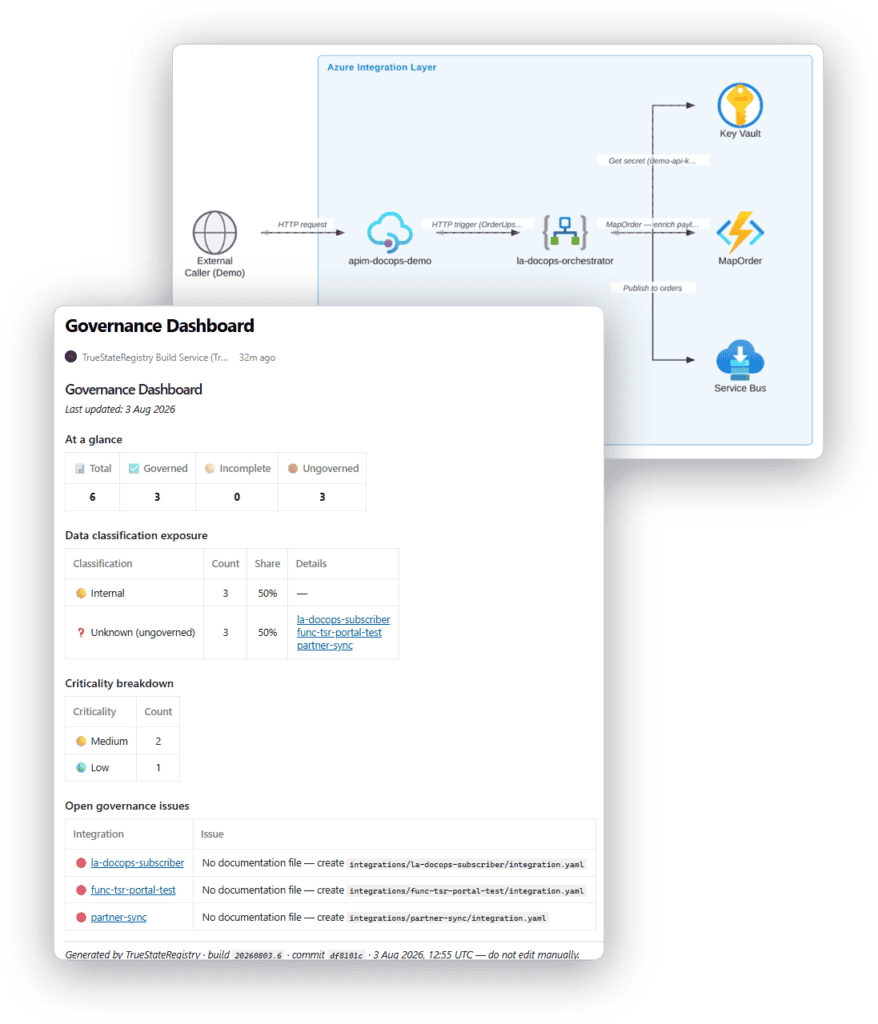
Nobody can see the whole picture
Integrations multiply quietly. A Logic App here, a Function there each moving data between systems, each built by someone who has since moved on. The gap between what your team thinks runs and what actually runs is where stale documentation, audit scrambles, and invisible risk all live. Three problems, one cause: there is no current, trustworthy map of your integration estate.
You maintain a few fields.
TrueStateRegistry discovers the rest.
Discovered automatically, on every deploy
✓ Logic Apps, Functions, APIM, Service Bus, and how they connect
✓ The source and target of each integration
✓ Repository, commit, and full change history
✓ Who approved each change (pull request and reviewer)
✓ Architecture and message-flow diagrams
✓ Run-as identity and Azure resource details
✓ Integrations that exist only as code and were never deployed
Provided once by your team
◦ Business owner
◦ Business purpose
◦ Criticality
◦ Data classification
One engine. Three things it gives you.
Same tool, same data, just the view that matters to you.
Security
See every integration moving your data, including the ones nobody registered.
Compliance
Hand auditors owner, data, and change evidence, without the scramble.
Documentation
Living docs and diagrams that never go stale, from a five-minute manifest.
Every integration has a state
Governed
A manifest exists with an owner and a data classification. Documented, owned, classified.
Incomplete
A manifest exists but is missing an owner or a classification. The exact missing field is flagged wherever it appears.
Ungoverned
A Logic App or Function running with no manifest at all. Detected live and flagged red for the developer to fix.
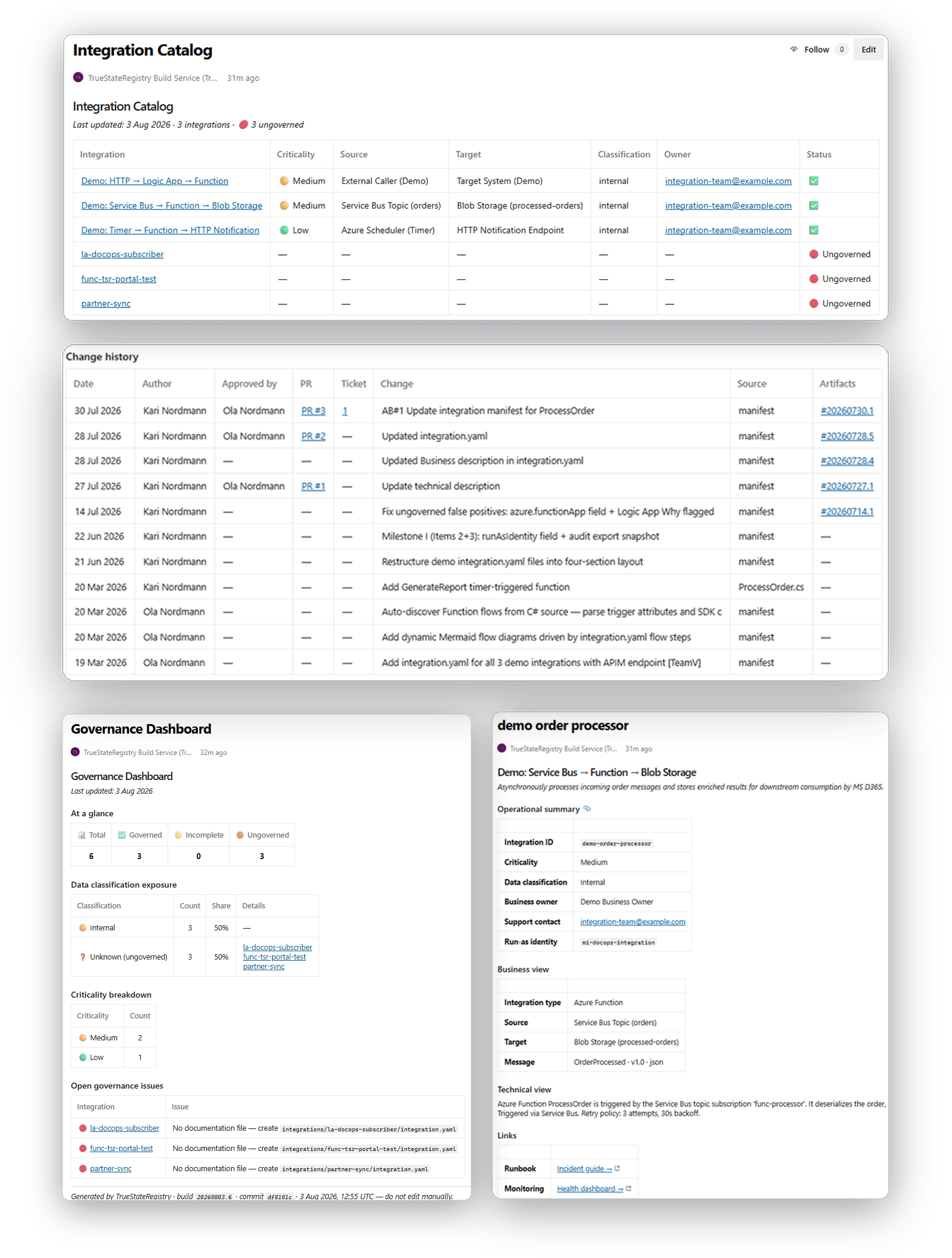
Four living pages, regenerated on every deploy
Integration Catalog every integration in one table: environment, criticality, source, target, classification, owner, status.
Governance Dashboard posture at a glance, data-classification exposure, criticality, open issues.
Per-integration pages architecture and message-flow diagrams, business and technical views, sample payloads.
Change history with approver who changed each integration, when, and who approved it via which PR.
How it works
Live in three steps, then automatic
Step 1
Add it to your pipeline. Add it to your Azure DevOps pipeline and point it at your resource groups. No platform to host, no agents.
Step 2
Fill in the stubs. It discovers your Logic Apps, Functions and repos, and opens a pull request with stub manifests. About five minutes each.
Step 3
It runs on every deploy. Every push regenerates your catalog, dashboard, diagrams and pages and flags anything ungoverned.
Developers touch one small file. The pipeline does the rest.
Documentation go stale because updating it is a chore. So we removed the chore. Developers fill in one small file with owner, criticality, classification, a one-line description. Everything else is discovered automatically. Five minutes once; then it maintains itself.
Runs where your data already lives
In your tenant
Everything runs inside your Azure environment. Nothing is sent to us. No phone-home.
Reads no secrets
Redaction strips secrets, connection strings, internal hostnames and tokens from every output. The build fails if a secret is detected.
Least privilege
Read-only discovery through your existing pipeline identity.
Verifiable
Every page carries the build ID, commit SHA and timestamp that produced it.
Never more than one deploy behind reality
A registry maintained by hand starts lying the moment something changes and nobody updates it. This one regenerates on every release, so it reflects your estate as of your last deploy, not as of whenever someone last remembered to edit a page. Anything new, or anything running without a manifest, shows up red on the very next run.
Be one of our founding customers
Hands-on setup with the engineer who built it, direct input into the roadmap, and locked-in early pricing in exchange for a paid pilot and your feedback.